
Ragty Server
Customer problem and solution
Section titled “Customer problem and solution”Without Ragty Server, employees and customers must search fragmented internal sources manually or rely on general-purpose LLMs that lack current, authorized company context. When they upload documents to an AI chat, that context can be lost over time, they cannot precisely select which documents should be referenced in a conversation, and updated documents must be uploaded again regularly. Answers can therefore be slow to find, unverifiable, or inaccurate.
Ragty Server solves this by grounding AI chat in an organization’s authorized documents through ingestion, hybrid retrieval, and cited responses. It can connect to public AI providers or to self-hosted Small Language Models (SLMs), so the same solution runs in regulated, air-gapped environments with no internet access. Users create a chat per use case and define which data sources it should use, so only users with the proper permissions can access specific data sources. Its tenant isolation and access controls help teams make private knowledge available to the right people in a usable form.
Multi-tenant Retrieval-Augmented Generation platform with vision-based document parsing, hybrid vector search, and AI-powered chat with citations.
What is RAG?
Section titled “What is RAG?”Retrieval-Augmented Generation (RAG) is a technique that enhances Large Language Models (LLMs) by giving them access to your private data at query time — without retraining the model.
The Problem RAG Solves
Section titled “The Problem RAG Solves”LLMs like GPT-4 or Claude are powerful but have critical limitations:
- Knowledge cutoff — they don’t know about your internal documents, policies, or recent data
- Hallucination — without grounding, they invent plausible-sounding but wrong answers
- No access control — public LLMs can’t respect your organization’s data permissions
- No citations — you can’t verify where an answer came from
How RAG Works
Section titled “How RAG Works”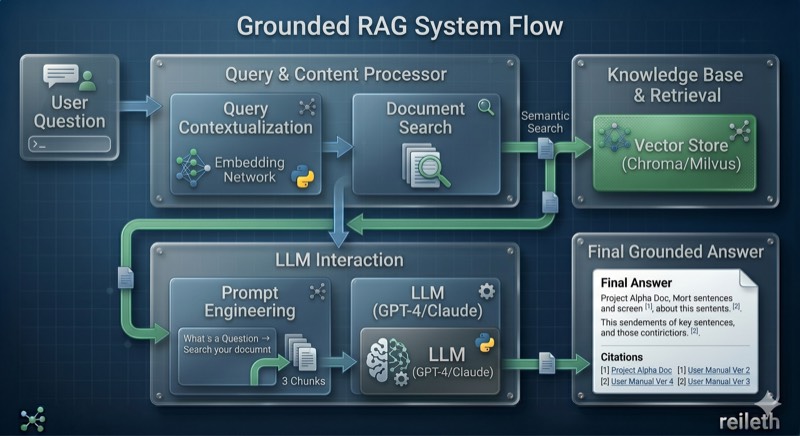
Instead of relying solely on the LLM’s training data, RAG retrieves relevant passages from your knowledge base and augments the LLM’s prompt with them before generating a response.
Real-World Examples
Section titled “Real-World Examples”| Scenario | Without RAG | With RAG |
|---|---|---|
| “What is our vacation policy?” | LLM guesses generic policies | Retrieves HR handbook → exact policy with page reference |
| “How do I configure the payment gateway?” | Outdated or wrong instructions | Retrieves latest internal docs → correct config steps |
| “What did we agree in the Q3 planning?” | “I don’t have access to that” | Retrieves meeting notes → summary with citations |
| “Show me compliance requirements for DACH” | Generic EU regulation info | Retrieves your compliance docs → specific requirements |
Why a Dedicated RAG Server?
Section titled “Why a Dedicated RAG Server?”Building RAG properly requires solving many hard problems:
- Document parsing — PDFs with tables, scanned pages, complex layouts need vision-based parsing (not just text extraction)
- Chunking — documents must be split into meaningful pieces that preserve context
- Hybrid search — combining semantic search (understands meaning) with keyword search (finds exact terms like product IDs)
- Multi-tenancy — each team/customer sees only their own documents
- Scalability — handling thousands of documents and concurrent users
- Observability — knowing why a particular answer was generated
The Ragty Server solves all of these as a production-ready platform.
Architecture
Section titled “Architecture”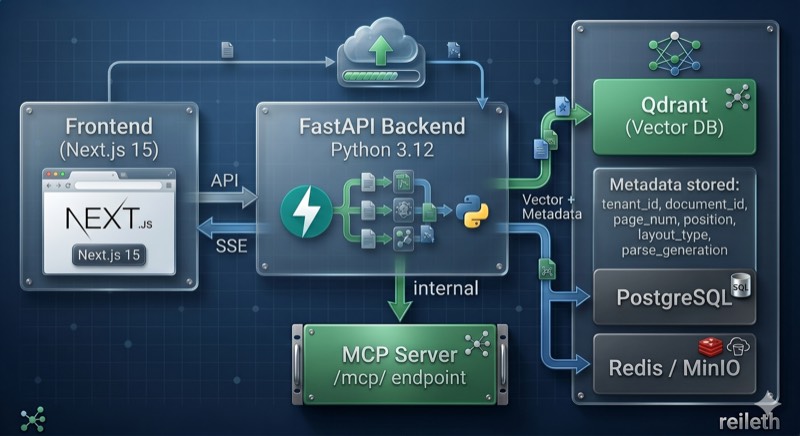
Tech Stack
Section titled “Tech Stack”| Component | Technology |
|---|---|
| Backend | Python 3.12–3.13 (3.13 container), FastAPI 0.139.2, Pydantic 2.11.3 |
| Frontend | Next.js 15.3.3, React 19.1, TypeScript 5.8 |
| Vector storage | PostgreSQL/pgvector by default; Qdrant when configured |
| Cache/Queue | Redis 7 (ARQ task queue) |
| Object Storage | MinIO/S3 |
| Relational DB | PostgreSQL 16 |
| Document Parsing | DeepDoc (vision-based), MarkItDown |
| Embeddings | OpenAI-compatible APIs, FastEmbed, Ollama, and the provider catalog |
| LLM | OpenAI-compatible provider APIs, including LiteLLM and self-hosted models |
| Observability | Optional Langfuse tracing and optional Ragas evaluation integration |
Prerequisites
Section titled “Prerequisites”- uv (Python package manager)
- Node.js 22+
- Docker & Docker Compose
Quick Start
Section titled “Quick Start”docker compose up --build --detachFor a fresh checkout, download the DeepDoc model assets and configure the initial platform administrator before building. See Run with Docker Compose for the complete step-by-step procedure, verification commands, logs, upgrades, and shutdown behavior.
| Service | URL |
|---|---|
| Frontend | http://localhost:8080 |
| Backend | http://localhost:8000 |
| Browser administration API | http://localhost:8080/admin-api/* |
| Public REST API | http://localhost:8000/api/v1/* |
| MCP | http://localhost:8000/mcp/ |
| Redis | localhost:6379 |
| PostgreSQL | localhost:5432 |
| MinIO S3 API / Console | http://localhost:9000 / http://localhost:9001 |
The Compose stack uses PostgreSQL/pgvector. The detailed runbook includes an
optional override that starts Qdrant and passes M8TY_RAGTY_QDRANT_URL to both
the backend and worker; PostgreSQL remains required for application data.
Local Development
Section titled “Local Development”Backend
Section titled “Backend”cd backenduv syncuv run uvicorn app.main:app --reloadFrontend
Section titled “Frontend”cd frontendnpm installnpm run devFrontend runs at http://localhost:8080.
API Boundaries
Section titled “API Boundaries”Ragty separates browser administration, external integrations, and MCP:
| Boundary | Client-facing path | Authentication |
|---|---|---|
| Browser administration | Frontend /admin-api/* |
HTTP-only session cookie; Next.js forwards an internal Bearer token |
| Public REST API | Backend /api/v1/* |
Dialog API key for the current chat-completions endpoint |
| MCP | Backend /mcp/ |
Bearer JWT or ragty-... personal API key |
| Health | Backend /health |
None |
Backend /admin-api/v1/* is an internal interface for the Next.js proxy and
should not be exposed as a public integration API.
Project Structure
Section titled “Project Structure”m8ty-rag/├── backend/│ ├── app/│ │ ├── main.py # FastAPI composition root│ │ ├── auth/ # Authentication bounded context│ │ ├── chat/ # Dialog/chat bounded context│ │ ├── embedding/ # Embedding bounded context│ │ ├── ingestion/ # Dataset/document ingestion│ │ ├── search/ # Hybrid search bounded context│ │ ├── mcp/ # MCP server (tools for AI agents)│ │ ├── tenant/ # Multi-tenancy bounded context│ │ ├── workspace/ # Workspace membership and scoped resources│ │ ├── admin/ # Platform-wide administration│ │ └── shared/ # Config, dependencies, security│ ├── pyproject.toml│ └── Dockerfile├── frontend/│ ├── src/app/ # Next.js App Router pages│ ├── src/components/ # Reusable UI components│ ├── src/lib/ # API client, config│ └── Dockerfile└── docker-compose.ymlTopics
Section titled “Topics”- Multi-Tenancy — Roles, permissions, tenant isolation
- MCP Server — AI agent integration, tools, client configuration
- API Keys — Personal and dataset-scoped key management
- Document Ingestion — Parsing, chunking, embedding pipeline
- Data Source Connectors — External source synchronization
- Search & Chat — Hybrid retrieval, reranking, streaming chat
- LLM & Model Providers — Chat, embedding, and reranking providers
- Embedded Chat Sharing — Embed chats via iframe or web component, public or for verified end users
- Chat Integration for Third-Party Applications — Integrator guide: snippets, user identity, ticket endpoint, security checklist
- Configuration — Environment variables, security, deployment
© m8ty GmbH 2023 · m8ty.eu