
Chat Integration for Third-Party Applications
This chapter is written for teams that integrate a Ragty chat into their own website or application — a public help page, a customer portal, an e-banking front end or any other web application. It describes everything you configure on your side. The Ragty administrator only has to create a share for you (see Prerequisites and Onboarding).
What you get
Section titled “What you get”- A complete chat (questions, streamed answers, cited sources, chat history) that you embed with a few lines of HTML.
- Two integration types, enabled per share:
| Integration | How it works | Choose it when |
|---|---|---|
Web component <m8ty-chat> |
A native custom element rendered in your page; styled with CSS variables and ::part() |
The chat should look like part of your application (recommended) |
| iframe | The chat runs on the Ragty origin inside a frame | You need maximum isolation, cannot allow third-party scripts, or run a legacy page |
- Two access modes, fixed per share:
| Mode | Who can chat | Identity and history |
|---|---|---|
| Public | Anyone visiting your allowed pages, no login | One anonymous identity per browser; history returns on the same device |
| Delegated | Only users signed in to your application | Your backend vouches for the user; history follows the user on every device and only their own documents are searched |
How the pieces fit together
Section titled “How the pieces fit together”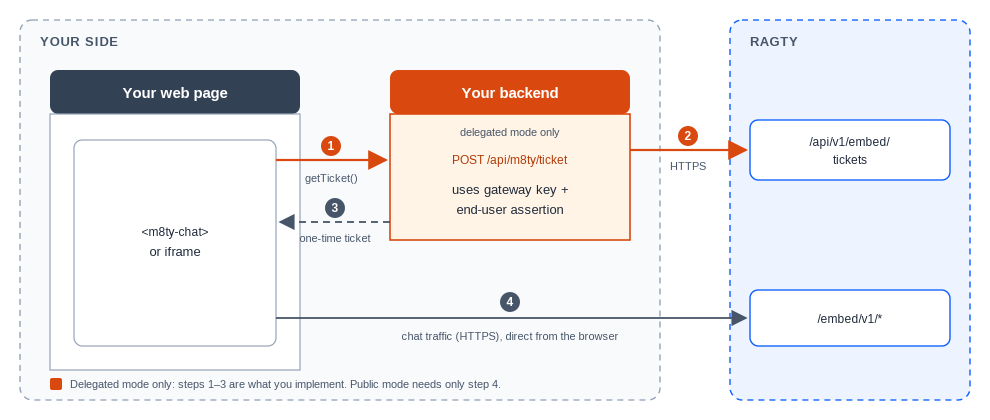
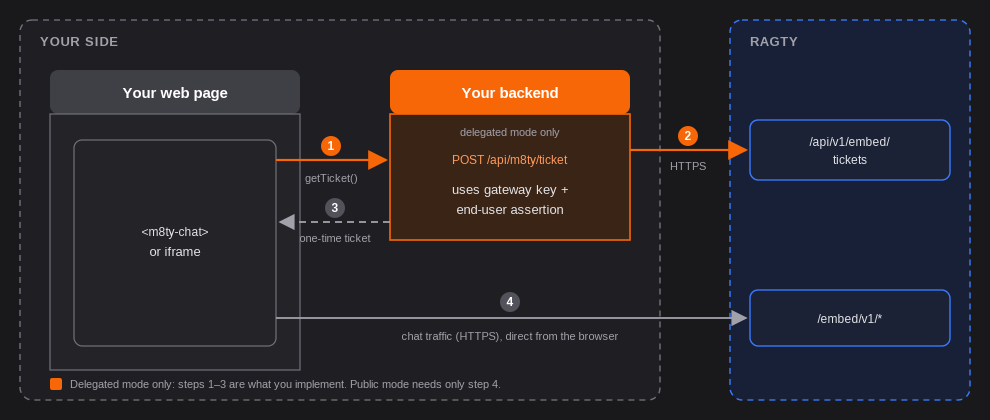
- Public shares need no backend work: paste the snippet, done.
- Delegated shares need one small endpoint in your backend that returns a one-time ticket for the signed-in user. The gateway key and the user’s identity token never reach the browser.
Integration steps
Section titled “Integration steps”- Prerequisites and onboarding — what to request from the Ragty administrator and what you receive.
- Public chat — embed a login-free chat.
- Delegated chat — identity provider, ticket endpoint (Java, TypeScript) and front end (JavaScript, TypeScript).
- Frameworks and templates — React, Angular, Vue and Velocity.
- Customization and reference — attributes, events, theming, HTTP endpoints and status codes.
- Security and go-live checklist — your responsibilities, the checklist and troubleshooting.
Related topics
Section titled “Related topics”© m8ty GmbH 2023 · m8ty.eu