Ragty Server
Customer problem and solution
Without Ragty Server, employees and customers must search fragmented internal sources manually or rely on general-purpose LLMs that lack current, authorized company context. When they upload documents to an AI chat, that context can be lost over time, they cannot precisely select which documents should be referenced in a conversation, and updated documents must be uploaded again regularly. Answers can therefore be slow to find, unverifiable, or inaccurate.
Ragty Server solves this by grounding AI chat in an organization's authorized documents through ingestion, hybrid retrieval, and cited responses. It can connect to public AI providers or to self-hosted Small Language Models (SLMs), so the same solution runs in regulated, air-gapped environments with no internet access. Users create a chat per use case and define which data sources it should use, so only users with the proper permissions can access specific data sources. Its tenant isolation and access controls help teams make private knowledge available to the right people in a usable form.
Multi-tenant Retrieval-Augmented Generation platform with vision-based document parsing, hybrid vector search, and AI-powered chat with citations.
What is RAG?
Retrieval-Augmented Generation (RAG) is a technique that enhances Large Language Models (LLMs) by giving them access to your private data at query time — without retraining the model.
The Problem RAG Solves
LLMs like GPT-4 or Claude are powerful but have critical limitations:
Knowledge cutoff — they don't know about your internal documents, policies, or recent data
Hallucination — without grounding, they invent plausible-sounding but wrong answers
No access control — public LLMs can't respect your organization's data permissions
No citations — you can't verify where an answer came from
How RAG Works
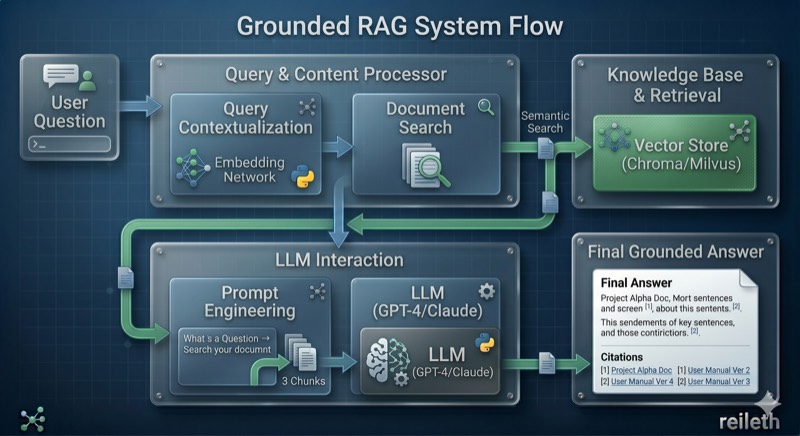
Instead of relying solely on the LLM's training data, RAG retrieves relevant passages from your knowledge base and augments the LLM's prompt with them before generating a response.
Real-World Examples
Scenario | Without RAG | With RAG |
|---|---|---|
"What is our vacation policy?" | LLM guesses generic policies | Retrieves HR handbook → exact policy with page reference |
"How do I configure the payment gateway?" | Outdated or wrong instructions | Retrieves latest internal docs → correct config steps |
"What did we agree in the Q3 planning?" | "I don't have access to that" | Retrieves meeting notes → summary with citations |
"Show me compliance requirements for DACH" | Generic EU regulation info | Retrieves your compliance docs → specific requirements |
Why a Dedicated RAG Server?
Building RAG properly requires solving many hard problems:
Document parsing — PDFs with tables, scanned pages, complex layouts need vision-based parsing (not just text extraction)
Chunking — documents must be split into meaningful pieces that preserve context
Hybrid search — combining semantic search (understands meaning) with keyword search (finds exact terms like product IDs)
Multi-tenancy — each team/customer sees only their own documents
Scalability — handling thousands of documents and concurrent users
Observability — knowing why a particular answer was generated
The Ragty Server solves all of these as a production-ready platform.
Architecture
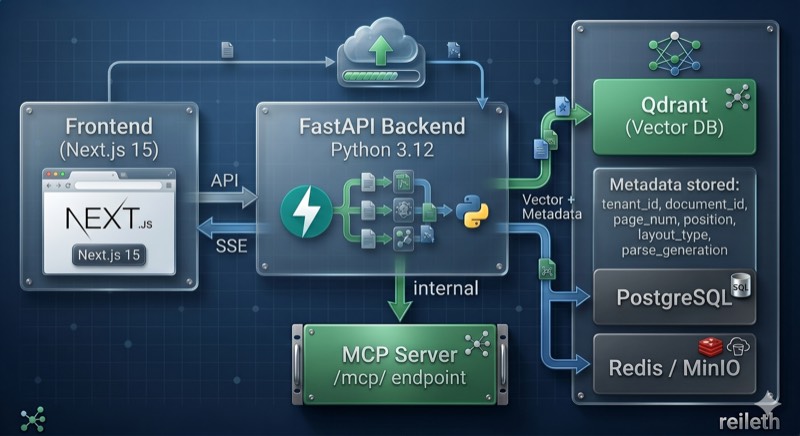
Tech Stack
Component | Technology |
|---|---|
Backend | Python 3.12–3.13 (3.13 container), FastAPI 0.139.2, Pydantic 2.11.3 |
Frontend | Next.js 15.3.3, React 19.1, TypeScript 5.8 |
Vector storage | PostgreSQL/pgvector by default; Qdrant when configured |
Cache/Queue | Redis 7 (ARQ task queue) |
Object Storage | MinIO/S3 |
Relational DB | PostgreSQL 16 |
Document Parsing | DeepDoc (vision-based), MarkItDown |
Embeddings | OpenAI-compatible APIs, FastEmbed, Ollama, and the provider catalog |
LLM | OpenAI-compatible provider APIs, including LiteLLM and self-hosted models |
Observability | Optional Langfuse tracing and optional Ragas evaluation integration |
Prerequisites
uv (Python package manager)
Quick Start
For a fresh checkout, download the DeepDoc model assets and configure the initial platform administrator before building. See Run with Docker Compose for the complete step-by-step procedure, verification commands, logs, upgrades, and shutdown behavior.
Service | URL |
|---|---|
Frontend | http://localhost:8080 |
Backend | http://localhost:8000 |
Browser administration API | http://localhost:8080/admin-api/* |
Public REST API | http://localhost:8000/api/v1/* |
MCP | http://localhost:8000/mcp/ |
Redis | localhost:6379 |
PostgreSQL | localhost:5432 |
MinIO S3 API / Console | http://localhost:9000 / http://localhost:9001 |
The Compose stack uses PostgreSQL/pgvector. The detailed runbook includes an optional override that starts Qdrant and passes M8TY_RAGTY_QDRANT_URL to both the backend and worker; PostgreSQL remains required for application data.
Local Development
Backend
Frontend
Frontend runs at http://localhost:8080.
API Boundaries
Ragty separates browser administration, external integrations, and MCP:
Boundary | Client-facing path | Authentication |
|---|---|---|
Browser administration | Frontend | HTTP-only session cookie; Next.js forwards an internal Bearer token |
Public REST API | Backend | Dialog API key for the current chat-completions endpoint |
MCP | Backend | Bearer JWT or |
Health | Backend | None |
Backend /admin-api/v1/* is an internal interface for the Next.js proxy and should not be exposed as a public integration API.
Project Structure
Topics
Multi-Tenancy — Roles, permissions, tenant isolation
MCP Server — AI agent integration, tools, client configuration
API Keys — Personal and dataset-scoped key management
Document Ingestion — Parsing, chunking, embedding pipeline
Data Source Connectors — External source synchronization
Search & Chat — Hybrid retrieval, reranking, streaming chat
LLM & Model Providers — Chat, embedding, and reranking providers
Configuration — Environment variables, security, deployment