Document Ingestion
Ragty processes uploaded and synchronized documents asynchronously, chunks their content, creates embeddings, and stores searchable vectors in PostgreSQL/pgvector or Qdrant.
Supported formats
Parser support is intentionally limited to formats implemented by the current parser engines.
Content | Extensions | Processing |
|---|---|---|
| DeepDoc layout detection, table structure recognition, OCR, and positional metadata | |
Images |
| Local DeepDoc OCR |
Office documents |
| Microsoft MarkItDown |
Text and structured files |
| Microsoft MarkItDown |
Legacy Office formats, email containers, audio, and video are not supported by the current ingestion pipeline.
Parser engines
The parser engine is selected per dataset.
Engine | Behavior |
|---|---|
| Uses the vision pipeline for PDFs, local OCR for supported images, and falls back to MarkItDown for supported non-vision formats. |
| Converts supported Office, markup, and structured-text formats to Markdown. |
DeepDoc
DeepDoc is suited to scanned or layout-heavy documents. It provides:
document layout detection for text, tables, figures, headers, and footers;
table structure recognition;
OCR for scanned pages and supported images;
page and bounding-box metadata used by citations.
DeepDoc runs inside the worker process; there is no DEEPDOC_URL remote-service setting. Keep M8TY_RAGTY_GPU_WORKER_CONCURRENCY=1 unless the deployed model and GPU capacity have been validated for greater concurrency.
MarkItDown
MarkItDown converts digitally structured documents to Markdown while preserving headings, lists, tables, and slide structure where the source format permits it. It does not require a GPU.
Pipeline
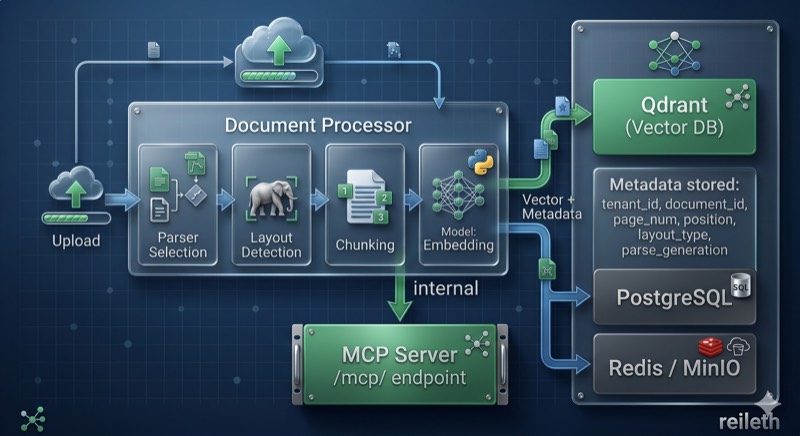
The high-level lifecycle is:
The API stores the original artifact in S3-compatible storage and creates a document record.
A parse job containing document references—not file bytes—is queued in Redis.
An ARQ worker parses, chunks, embeds, and writes the vectors.
The document status is updated. Successful documents become searchable when processing reaches
DONE.
Queued documents remain unclaimed while no healthy worker is available. Workers refresh the namespaced Redis health key every 10 seconds, allowing the UI and API to distinguish a waiting queue from active processing.
Embedding providers
Embedding models are configured through Settings → Providers and selected per dataset. OpenAI-compatible providers and local Ollama endpoints are supported; the optional fallback environment settings are:
Variable | Default |
|---|---|
| empty |
|
|
Changing the embedding model requires affected documents to be re-embedded so that stored and query vectors use the same vector space.
Chunking and document generations
Chunking behavior is configured per dataset. Re-parsing increments the document's parse_generation. Before the replacement chunks are stored, the worker deletes existing vectors for that document and stamps the new points with the current generation.
Worker configuration
The same ARQ worker class handles document parsing and scheduled data-source synchronization.
Variable | Description | Default |
|---|---|---|
| Process-count setting for deployment launchers that consume it; the direct ARQ command starts one process |
|
| Concurrent ARQ jobs per worker |
|
| Concurrent GPU-intensive parsing work |
|
Scale worker replicas deliberately. DeepDoc inference is memory-intensive, and each replica must use the same PostgreSQL, Redis, object-storage, and vector-backend configuration as the API.