Chat Integration for Third-Party Applications
This chapter is written for teams that integrate a Ragty chat into their own website or application — a public help page, a customer portal, an e-banking front end or any other web application. It describes everything you configure on your side. The Ragty administrator only has to create a share for you (see Prerequisites and Onboarding).
What you get
A complete chat (questions, streamed answers, cited sources, chat history) that you embed with a few lines of HTML.
Two integration types, enabled per share:
Integration | How it works | Choose it when |
|---|---|---|
Web component | A native custom element rendered in your page; styled with CSS variables and | The chat should look like part of your application (recommended) |
iframe | The chat runs on the Ragty origin inside a frame | You need maximum isolation, cannot allow third-party scripts, or run a legacy page |
Two access modes, fixed per share:
Mode | Who can chat | Identity and history |
|---|---|---|
Public | Anyone visiting your allowed pages, no login | One anonymous identity per browser; history returns on the same device |
Delegated | Only users signed in to your application | Your backend vouches for the user; history follows the user on every device and only their own documents are searched |
How the pieces fit together
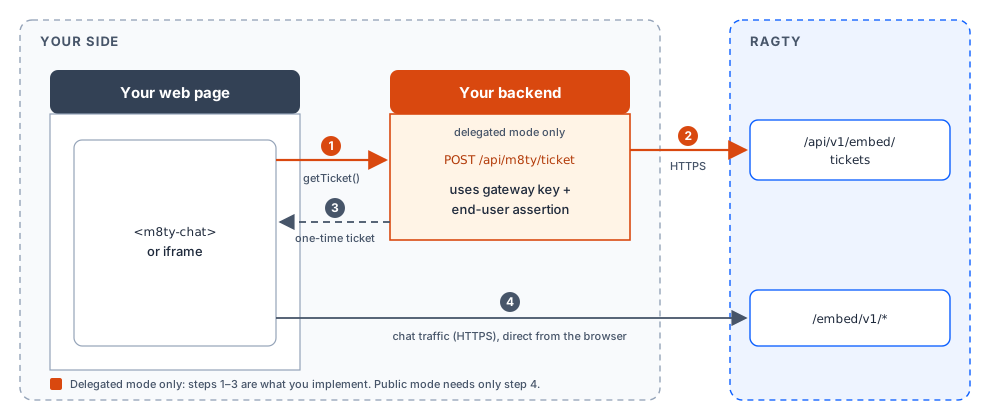
Public shares need no backend work: paste the snippet, done.
Delegated shares need one small endpoint in your backend that returns a one-time ticket for the signed-in user. The gateway key and the user's identity token never reach the browser.
Integration steps
Prerequisites and onboarding — what to request from the Ragty administrator and what you receive.
Public chat — embed a login-free chat.
Delegated chat — identity provider, ticket endpoint (Java, TypeScript) and front end (JavaScript, TypeScript).
Frameworks and templates — React, Angular, Vue and Velocity.
Customization and reference — attributes, events, theming, HTTP endpoints and status codes.
Security and go-live checklist — your responsibilities, the checklist and troubleshooting.