Help Instance Help

Delegated Chat

A delegated share shows each user of your application only their own chat history and their own documents. Your backend vouches for the user; the browser never sees the gateway key or the user's assertion.

Read How the User Is Passed first — it defines exactly how the user is passed (sub of a signed JWT in X-End-User-Assertion).

Flow
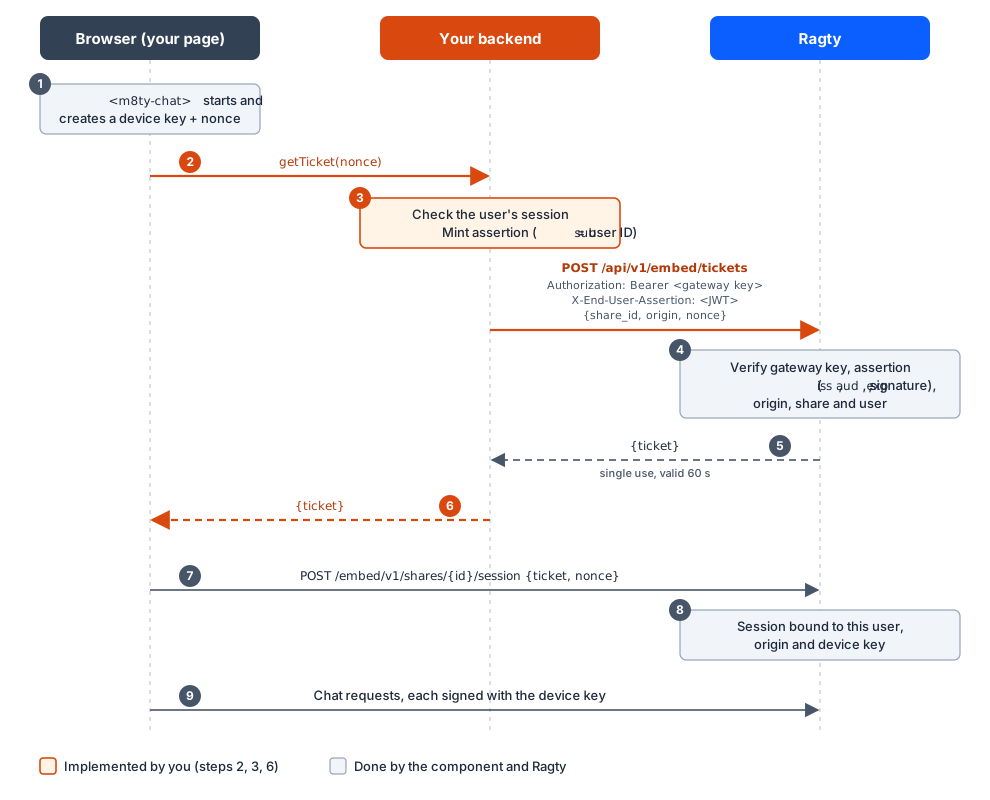
Delegated chat: ticket flow between browser, your backend and Ragty

You implement steps 2, 3 and 6 (highlighted in orange). Everything else is done by the component and Ragty.

Step 1: Provide the end-user assertion

Configure your identity provider so that your backend can obtain, for the currently signed-in user, a JWT with:

  • iss = the issuer registered in Ragty, aud = the registered audience,

  • sub = the immutable user ID (same value as used for document ingestion),

  • exp ≤ 5 minutes, signed RS256 with a kid from the registered JWKS.

With Keycloak or another OIDC provider use token exchange to obtain a token with the Ragty audience. If your IdP cannot do that, mint the assertion yourself:

Mint the assertion yourself

Generate an RSA key pair (2048 bit or more) for this purpose only, keep the private key in your secret manager, and publish the public key as a JWKS ({"keys":[{…,"kid":"2026-11-portal","use":"sig","alg":"RS256"}]}) at an HTTPS URL. Give that URL to the Ragty administrator.

// Maven: com.nimbusds:nimbus-jose-jwt import com.nimbusds.jose.*; import com.nimbusds.jose.crypto.RSASSASigner; import com.nimbusds.jose.jwk.RSAKey; import com.nimbusds.jwt.JWTClaimsSet; import com.nimbusds.jwt.SignedJWT; import java.time.Instant; import java.util.Date; public final class EndUserAssertionService { private static final String ISSUER = "https://idp.example.com/realms/customers"; private static final String AUDIENCE = "ragty-chat"; private final RSAKey signingKey; // private RSA JWK with kid, loaded from your secret manager public EndUserAssertionService(RSAKey signingKey) { this.signingKey = signingKey; } /** @param userId immutable ID of the authenticated user — never taken from the browser */ public String issueFor(String userId) throws JOSEException { Instant now = Instant.now(); JWTClaimsSet claims = new JWTClaimsSet.Builder() .issuer(ISSUER) .audience(AUDIENCE) .subject(userId) .issueTime(Date.from(now)) .expirationTime(Date.from(now.plusSeconds(120))) .build(); SignedJWT jwt = new SignedJWT( new JWSHeader.Builder(JWSAlgorithm.RS256).keyID(signingKey.getKeyID()).type(JOSEObjectType.JWT).build(), claims); jwt.sign(new RSASSASigner(signingKey)); return jwt.serialize(); } }
// npm install jose import { SignJWT, importPKCS8 } from "jose"; const ISSUER = "https://idp.example.com/realms/customers"; const AUDIENCE = "ragty-chat"; const KID = "2026-11-portal"; const privateKey = await importPKCS8(process.env.ASSERTION_PRIVATE_KEY_PEM!, "RS256"); /** userId: immutable ID of the authenticated user — never taken from the browser. */ export async function issueEndUserAssertion(userId: string): Promise<string> { return new SignJWT({}) .setProtectedHeader({ alg: "RS256", kid: KID, typ: "JWT" }) .setIssuer(ISSUER) .setAudience(AUDIENCE) .setSubject(userId) .setIssuedAt() .setExpirationTime("2m") .sign(privateKey); }

Step 2: Implement the ticket endpoint (your backend)

Add one authenticated endpoint, e.g. POST /api/m8ty/ticket, that:

  1. requires the user's normal session (and your CSRF protection),

  2. validates the nonce from the request body,

  3. mints the assertion for the session user,

  4. calls Ragty with the gateway key and returns the ticket JSON unchanged.

import java.net.URI; import java.net.http.HttpClient; import java.net.http.HttpRequest; import java.net.http.HttpResponse; import java.time.Duration; import java.util.Map; import java.util.regex.Pattern; import org.springframework.http.*; import org.springframework.security.core.Authentication; import org.springframework.web.bind.annotation.*; @RestController class M8tyTicketController { private static final URI TICKETS = URI.create("https://rag.example.com/api/v1/embed/tickets"); private static final String SHARE_ID = "shr_XXXXXXXXXXXXXXXXXXXXXXXX"; private static final String PAGE_ORIGIN = "https://portal.example.com"; // the origin showing the chat private static final Pattern NONCE = Pattern.compile("[A-Za-z0-9_-]{16,128}"); private final HttpClient http = HttpClient.newBuilder().connectTimeout(Duration.ofSeconds(5)).build(); private final String gatewayKey = System.getenv("M8TY_GATEWAY_KEY"); // from your secret manager private final EndUserAssertionService assertions; M8tyTicketController(EndUserAssertionService assertions) { this.assertions = assertions; } @PostMapping(path = "/api/m8ty/ticket", produces = MediaType.APPLICATION_JSON_VALUE) ResponseEntity<String> ticket(@RequestBody Map<String, String> body, Authentication auth) throws Exception { String nonce = body.get("nonce"); if (nonce == null || !NONCE.matcher(nonce).matches()) { return ResponseEntity.badRequest().build(); } String userId = auth.getName(); // the authenticated user only String assertion = assertions.issueFor(userId); // sub = userId String json = "{\"share_id\":\"" + SHARE_ID + "\",\"origin\":\"" + PAGE_ORIGIN + "\",\"nonce\":\"" + nonce + "\"}"; HttpRequest request = HttpRequest.newBuilder(TICKETS) .timeout(Duration.ofSeconds(10)) .header("Authorization", "Bearer " + gatewayKey) .header("X-End-User-Assertion", assertion) .header("Content-Type", "application/json") .POST(HttpRequest.BodyPublishers.ofString(json)) .build(); HttpResponse<String> response = http.send(request, HttpResponse.BodyHandlers.ofString()); if (response.statusCode() != 200) { // Log status only — never the assertion, the key or the response body. return ResponseEntity.status(HttpStatus.BAD_GATEWAY).build(); } return ResponseEntity.ok() .cacheControl(CacheControl.noStore()) .body(response.body()); // {"ticket":"…","expires_in":60} } }
import express from "express"; import { issueEndUserAssertion } from "./assertion"; const SHARE_ID = "shr_XXXXXXXXXXXXXXXXXXXXXXXX"; const PAGE_ORIGIN = "https://portal.example.com"; // the origin showing the chat const NONCE = /^[A-Za-z0-9_-]{16,128}$/; export const ticketRouter = express.Router(); ticketRouter.post("/api/m8ty/ticket", requireLogin, verifyCsrf, async (req, res) => { const nonce = String(req.body?.nonce ?? ""); if (!NONCE.test(nonce)) return res.sendStatus(400); const assertion = await issueEndUserAssertion(req.user.id); // sub = authenticated user const response = await fetch("https://rag.example.com/api/v1/embed/tickets", { method: "POST", headers: { Authorization: `Bearer ${process.env.M8TY_GATEWAY_KEY}`, "X-End-User-Assertion": assertion, "Content-Type": "application/json", }, body: JSON.stringify({ share_id: SHARE_ID, origin: PAGE_ORIGIN, nonce }), }); if (!response.ok) return res.sendStatus(502); // log status only res.set("Cache-Control", "no-store").json(await response.json()); // { ticket, expires_in } });

Step 3: Connect the front end

The component calls your getTicket function with a nonce whenever it needs a session — on start, about every 10 minutes when the session expires, and after an administrator ended all sessions. Return the ticket JSON of your endpoint.

<script type="module" src="https://rag.example.com/embed-assets/v1/m8ty-chat.js" crossorigin="anonymous"></script> <m8ty-chat id="support-chat" share="shr_XXXXXXXXXXXXXXXXXXXXXXXX" locale="de" style="display:block;height:600px"></m8ty-chat> <script type="module"> const chat = document.getElementById("support-chat"); chat.getTicket = async (nonce) => { const response = await fetch("/api/m8ty/ticket", { method: "POST", credentials: "same-origin", headers: { "Content-Type": "application/json", "X-CSRF-Token": window.csrfToken }, body: JSON.stringify({ nonce }), }); if (!response.ok) throw new Error("ticket request failed"); return response.json(); // { ticket, expires_in } }; chat.addEventListener("m8ty-session-expired", () => { // e.g. the user logged out in another tab: send them to your login page }); </script>
// Copy https://rag.example.com/embed-assets/v1/m8ty-chat.d.ts into your project. import type { M8tyChat, M8tyTicket } from "./m8ty-chat"; await import(/* webpackIgnore: true */ "https://rag.example.com/embed-assets/v1/m8ty-chat.js"); async function getTicket(nonce: string): Promise<M8tyTicket> { const response = await fetch("/api/m8ty/ticket", { method: "POST", credentials: "same-origin", headers: { "Content-Type": "application/json", "X-CSRF-Token": csrfToken() }, body: JSON.stringify({ nonce }), }); if (!response.ok) throw new Error("ticket request failed"); return (await response.json()) as M8tyTicket; } const chat = document.createElement("m8ty-chat") as M8tyChat; chat.setAttribute("share", "shr_XXXXXXXXXXXXXXXXXXXXXXXX"); chat.getTicket = getTicket; chat.addEventListener("m8ty-error", (event) => console.warn("chat error", event.detail.code)); document.getElementById("chat-container")?.append(chat);
<iframe id="support-chat" data-src="https://rag.example.com/embed/shr_XXXXXXXXXXXXXXXXXXXXXXXX?locale=de" title="Chat" allow="clipboard-write" referrerpolicy="strict-origin" style="width:100%;height:600px;border:0"></iframe> <script type="module"> import { connectIframe } from "https://rag.example.com/embed-assets/v1/m8ty-chat.js"; const frame = document.getElementById("support-chat"); frame.src = frame.dataset.src; // set src and connect in the same step connectIframe(frame, { getTicket: async (nonce) => { const response = await fetch("/api/m8ty/ticket", { method: "POST", credentials: "same-origin", headers: { "Content-Type": "application/json", "X-CSRF-Token": window.csrfToken }, body: JSON.stringify({ nonce }), }); if (!response.ok) throw new Error("ticket request failed"); return response.json(); }, }); </script>

The iframe asks your page for tickets via postMessage; connectIframe answers only that iframe and only towards the Ragty origin. The iframe repeats its request until it is answered (up to 15 seconds); rendering it with data-src and loading it once the listener is connected answers the first request immediately. Framework examples: iframe. Keep referrerpolicy="strict-origin" so the iframe can determine your page origin.

For server-rendered Java pages. Fill the context as shown in the public example and additionally put your CSRF token (csrfToken) and the logged-in user (currentUser) into it.

## m8ty-chat-delegated.vm — rendered for logged-in users only #if($currentUser) <meta name="m8ty-csrf" content="$esc.html($csrfToken)"> <script type="module" nonce="$esc.html($cspNonce)" src="$esc.html($ragtyUrl)/embed-assets/v1/m8ty-chat.js" crossorigin="anonymous"></script> <m8ty-chat id="support-chat" share="$esc.html($shareId)" locale="$esc.html($locale)" style="display:block;height:600px"></m8ty-chat> <script type="module" nonce="$esc.html($cspNonce)"> const chat = document.getElementById("support-chat"); const csrf = document.querySelector('meta[name="m8ty-csrf"]').content; chat.getTicket = async (nonce) => { const response = await fetch("/api/m8ty/ticket", { method: "POST", credentials: "same-origin", headers: { "Content-Type": "application/json", "X-CSRF-Token": csrf }, body: JSON.stringify({ nonce }), }); if (!response.ok) throw new Error("ticket request failed"); return response.json(); // { ticket, expires_in } }; </script> #end
  • $currentUser is used only for the #if. Never write a user ID into the page — the user is passed exclusively by your ticket endpoint (Step 2) inside the signed assertion.

  • The JavaScript contains no $ or # sequences, so Velocity leaves it untouched. If you extend it, avoid template literals (${…}) or wrap the block in #[[ … ]]# (unparsed content).

Step 4: Verify

  1. Log in as user A, ask a question, reload — the history is shown.

  2. Log in as user A on another browser — the same history is shown.

  3. Log in as user B — an empty chat; A's chats are not visible.

  4. Call your ticket endpoint without a session — it must return 401/403 and never reach Ragty.

  5. Open the page from a non-allowed origin — the chat must not start.

12 November 2026