AI Chat
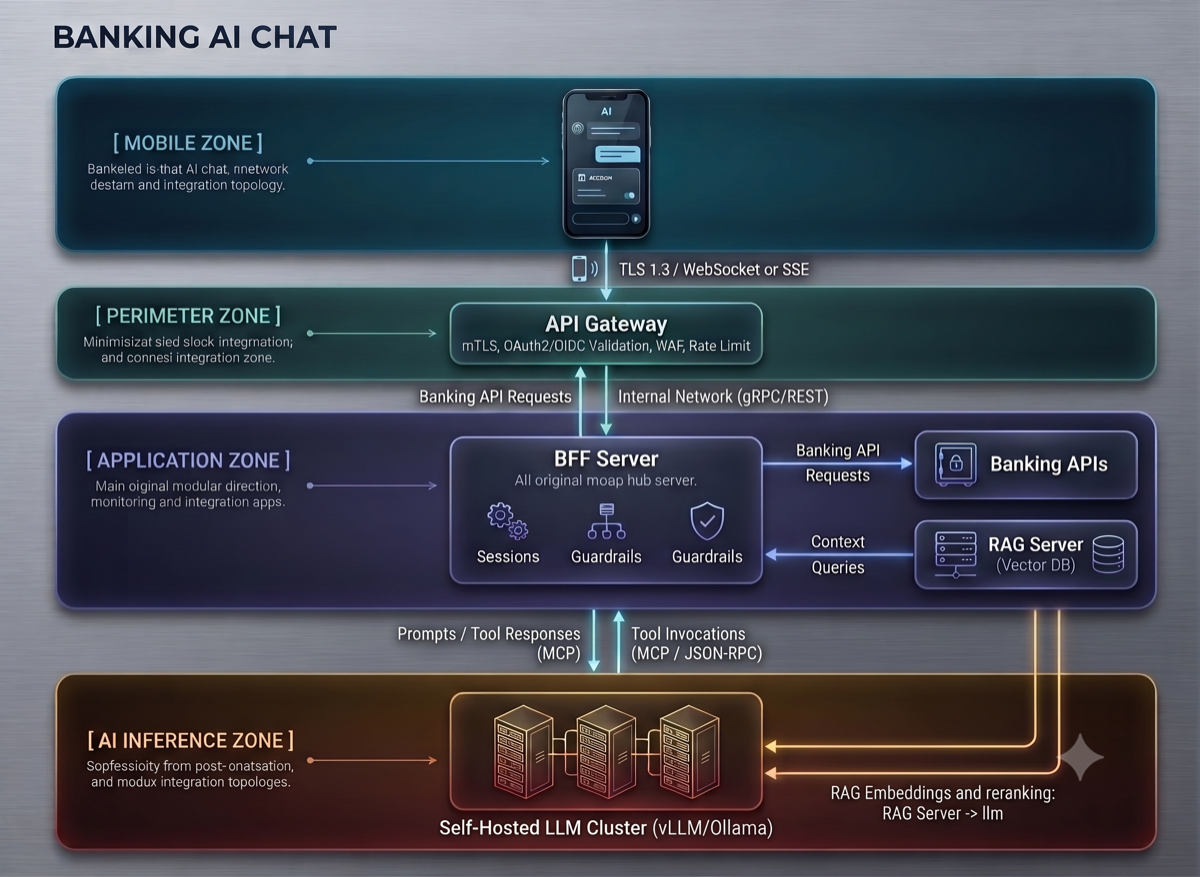
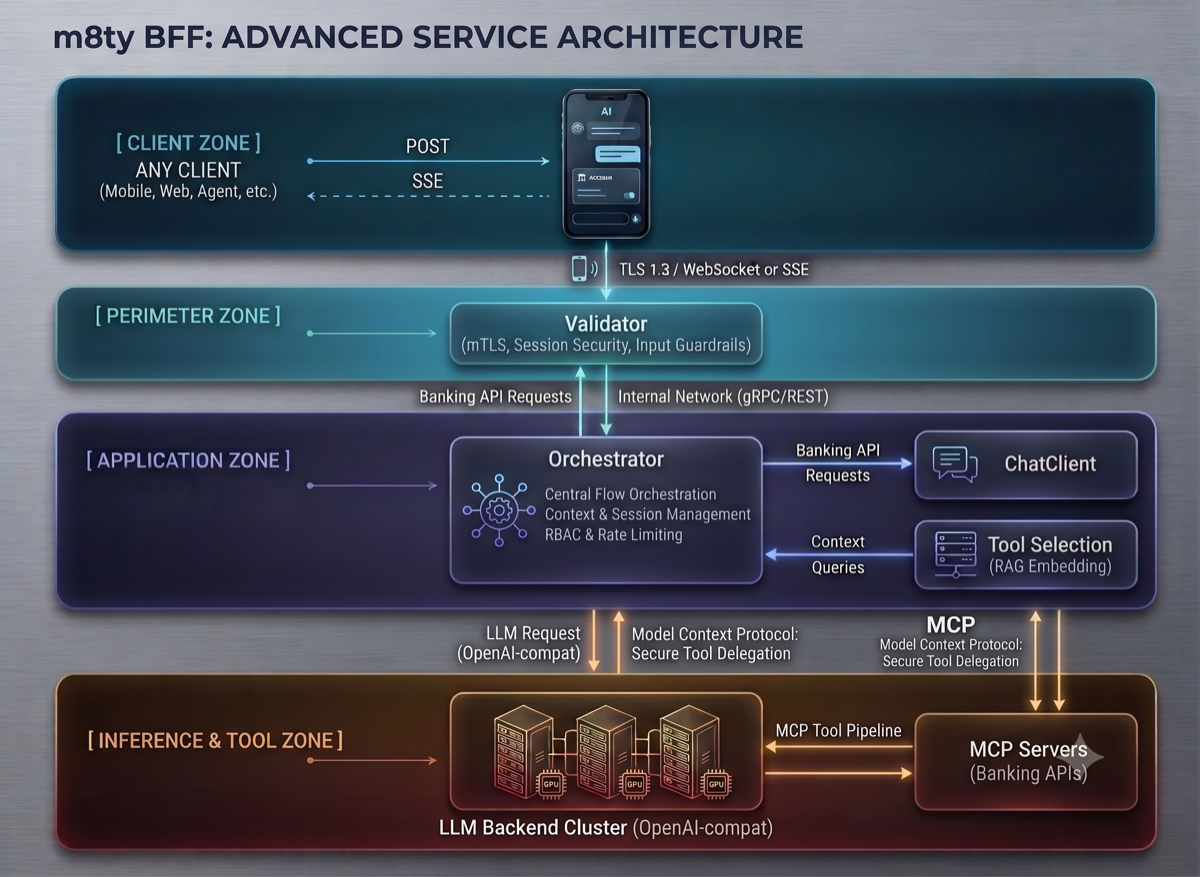
The m8ty server provides a streaming AI chat endpoint that acts as a Backend-for-Frontend (BFF) orchestrator. Any client sends conversation history and optionally a system prompt; the server handles LLM interaction, tool selection, and tool execution internally.
Architecture Overview
Detailed Request Flow
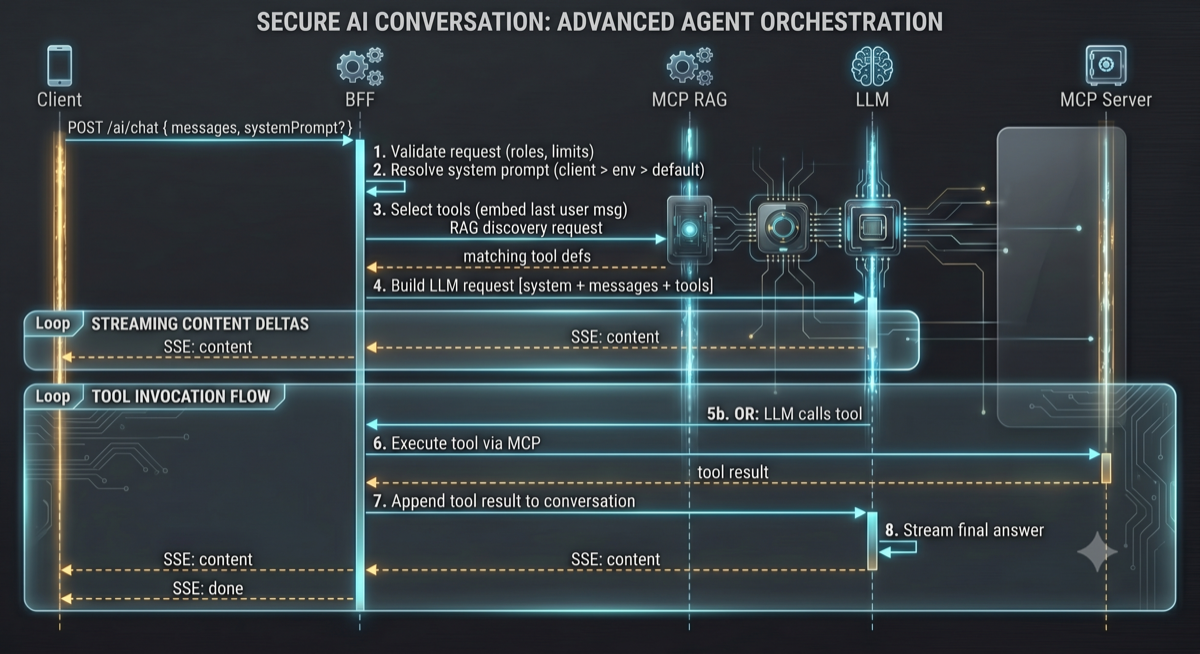
The following diagram shows the complete sequence of a single AI chat request, including tool call handling:
Flow Steps
Validation — The BFF validates the request: messages non-empty, within limits (max 30), content not blank, last message is
userrole.System Prompt Resolution — Priority: client-provided
systemPrompt→ environment variableM8TY_AI_CHAT_SYSTEM_PROMPT→ built-in default.Tool Selection — The latest user message is embedded and compared against the MCP RAG tool catalog via semantic search. Only the top-K matching tools (above minimum score) are selected.
LLM Request — The BFF constructs a full OpenAI-compatible request: system message + conversation history + selected tool definitions.
Streaming Response — The LLM streams back either content deltas (forwarded as SSE to client) or tool call requests.
Tool Execution — When the LLM requests a tool call, the BFF executes it via MCP using the client's Bearer token for authentication.
Conversation Loop — Tool results are appended to the conversation and sent back to the LLM for the next iteration (max iterations configurable).
Final Answer — Once the LLM produces a text response (no more tool calls), it is streamed to the client followed by a
doneevent.
Endpoint
Response: text/event-stream
Request Format
Field | Type | Required | Description |
|---|---|---|---|
| Array | Yes | Chronological user/assistant conversation history. Min 1 item. Last message must be |
| String | No | Custom system instruction (max 8000 chars). If omitted, the server default is used. |
Each message object:
Field | Type | Description |
|---|---|---|
| String |
|
| String | Message text (non-blank) |
Response Format (SSE)
The response is a stream of server-sent events. Each event has a type and JSON payload:
Event Type | Description |
|---|---|
| Assistant text delta — append to the response |
| Stream complete |
| Error occurred — treat as terminal |
Examples
Simple question (no history)
Follow-up with conversation history
With custom system prompt
SSE response example
System Prompt
The system prompt defines assistant behavior. It is resolved in this priority:
Client sends
systemPromptin request — used for that specific requestEnvironment variable
M8TY_AI_CHAT_SYSTEM_PROMPT— used as the server defaultBuilt-in default — banking assistant instruction (see below)
Built-in default system prompt
Conversation History
The server is stateless — it does not persist conversations. The client owns the history:
Client stores full conversation locally (e.g. secure storage, database)
On every new user message, client sends the entire relevant history
Server processes it, returns the assistant response via SSE
Client appends the new assistant response to local history
Next request includes all prior messages again
This follows the standard pattern used by OpenAI and other chat APIs.
History limits
Constraint | Default | Env Variable |
|---|---|---|
Max messages per request | 30 |
|
Max content per message | 32,000 chars |
|
Clients should trim oldest message pairs when approaching the limit.
Configuration
All settings are configurable via environment variables:
Variable | Description | Default |
|---|---|---|
| LLM backend base URL |
|
| Chat completions endpoint path |
|
| API key for the LLM backend | — |
| Custom authorization header value | — |
| Model identifier |
|
| Request timeout |
|
| Disable thinking/reasoning mode |
|
| Max messages per request |
|
| Max content length per message |
|
| Max tool call loop iterations |
|
| Top-K tools selected per request |
|
| Minimum relevance score for tool selection |
|
| Default system prompt | Built-in banking instruction |
Tool Selection
The BFF automatically selects relevant MCP tools for each request:
Extracts the latest
usermessage as a semantic queryUses the MCP RAG embedding search to find matching tools (top-K, min score)
Sends only the selected tools to the LLM — not the full catalog
When the LLM calls a tool, the BFF executes it using the client's Bearer token
Tool results are fed back to the LLM until a final text answer is produced
The client does not need to know about tools — all orchestration is server-side.
Tool call iteration limit
If the LLM keeps calling tools without producing a final answer, the loop is capped at M8TY_AI_CHAT_MAX_TOOL_CALL_ITERATIONS (default: 3). After that, an error event is emitted.
Security
Authentication: Every request must carry a valid Bearer token
Token forwarding: The client's Bearer token is forwarded to MCP servers for tool execution — ensuring tool calls respect the user's permissions
No secrets in messages: The API rejects system/tool/developer roles from clients. Only
userandassistantare accepted.Content isolation: Tool call internals (arguments, raw results) are not exposed to the client
Validation Rules
messagesmust not be emptymessagesmust not exceed 30 items (configurable)Each
contentmust not be blankEach
contentmust not exceed 32,000 characters (configurable)Last message must have role
userOnly
userandassistantroles are accepted
Error Responses
Status | Condition |
|---|---|
400 | Validation failure (empty messages, content too long, wrong role) |
401 | Missing or invalid Bearer token |
500 | Internal server error |
Errors within the stream are delivered as SSE error events: