m8ty Documentation
Architecture Overview
m8ty is an ecosystem of 2 main components:
frontend / apps
backend / API gateway
Both components can be used independently of each other. In the case of the app, however, the API of the m8ty backend must be implemented when using the standard components for data retrieval.
The advantage of using the m8ty backend in combination with the app is that, on the one hand, the API is already fully tailored to the app (backend for frontend API / BFF). In addition, the API contains some logical components to pass data to the app in an optimized way or to enable certain functionalities based on simple account data.
The primary role of the backend is to abstract data into a data model and API that can be easily interpreted and used by the app. This is important in order to be able to
Have an API that fits the requirements of the app and its different views
be able to adapt to changes in third-party APIs without having to redeploy the app (which can take a few days in the stores)
be able to integrate with all backends with all their specific features
The backend becomes the interface between the app's API and the specific backend of banks and financial interfaces.
The following figure gives an overview of the most important parts, focusing on the app, respectively on the structure of the modules.
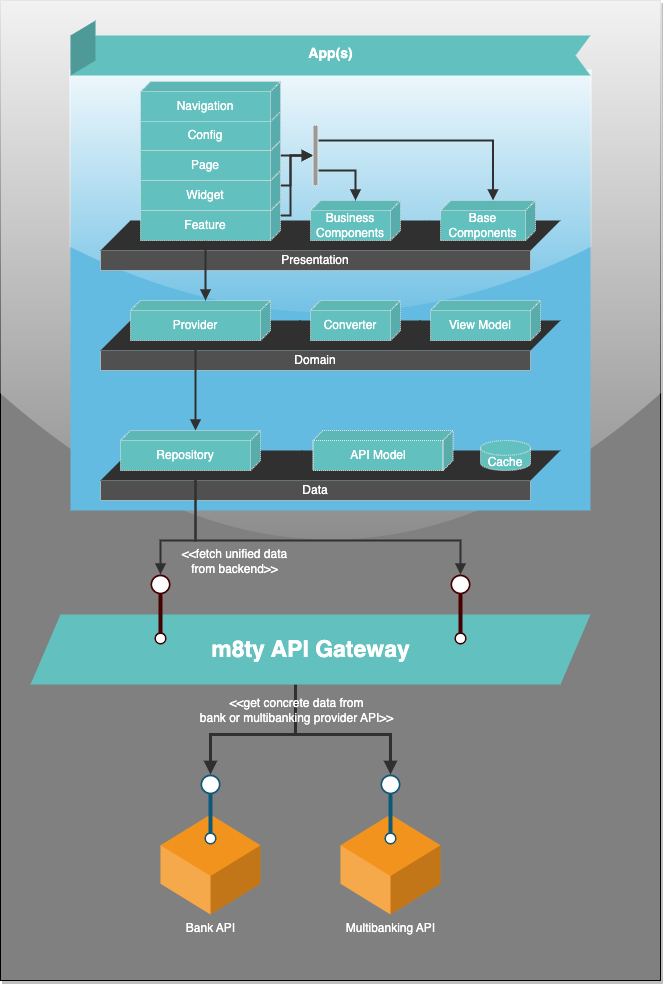
The app and its modules are written in Flutter/Dart. This allows the main code to be written once and compiled into a native app for each platform.
Depending on the requirements, some native functions are written in Kotlin for Android or Swift for Apple. However, this is only used to have a bridge to native components like camera access.
The result is a real native app, without any web components. It makes the app more smoothly, performant and secure.
Benefits
Better handling if the connection to the server gets lost
Much less stuttering
Brings the OS feeling to the app instead of having only a responsive representation
Better integration of native (hardware and OS) features and full integration of them
Much easier handling of the components on different device sizes
More stable development (e.g. no issues with a short WebKit or Chrome update in the background)
More planning security for new OS updates
More interactive and intuitive UX
Much easier testing (what you see is what you get and not what you think it should be)